
If you are reading this, you are probably in one of two places.
You have already tried Google Ads, spent real money, and did not get the results you expected. Or you have not tried them yet because you have heard enough horror stories from other contractors to make you skeptical before you even start.
Either way, the story is usually the same. A contractor runs ads, spends a few thousand dollars, gets a handful of calls or none at all, and shuts it off.
Most of the time it is not because Google Ads does not work. It is because nobody set the account up to actually work. It is a running engine with no steering wheel.
This guide walks through how Google Ads actually works for home service businesses, what separates a campaign that fills your schedule from one that drains your budget, and what needs to be in place before you spend a dollar.
We focus specifically on HVAC, plumbing, and roofing contractors. We have dedicated guides for each trade if you want to go deeper. Everything here applies across the board.
Do Google Ads Actually Work for Contractors?
Yes. But the real answer is more specific than that.
Google Ads work because of intent.
When someone types “emergency AC repair” or “plumber near me” at 9pm on a Tuesday, they are not browsing. They have a problem and they need it fixed tonight. That kind of intent is worth a lot.
Compare that to Facebook. When your ad shows up in someone’s feed, they did not ask to see it. You can still get leads there, but you are interrupting someone. On Google, you are answering someone who already raised their hand.
There are over 900,000 contractors in the U.S. In most cities, your potential customers have ten or fifteen options a click away. The contractors who consistently win jobs are not always the most experienced. They are the ones showing up at the top of the page when someone needs help.
Google Ads is one of the fastest ways to get there.
Google Ads vs. Local Services Ads: What Is the Difference?
These are two completely different products and it is worth understanding both before you spend anything.
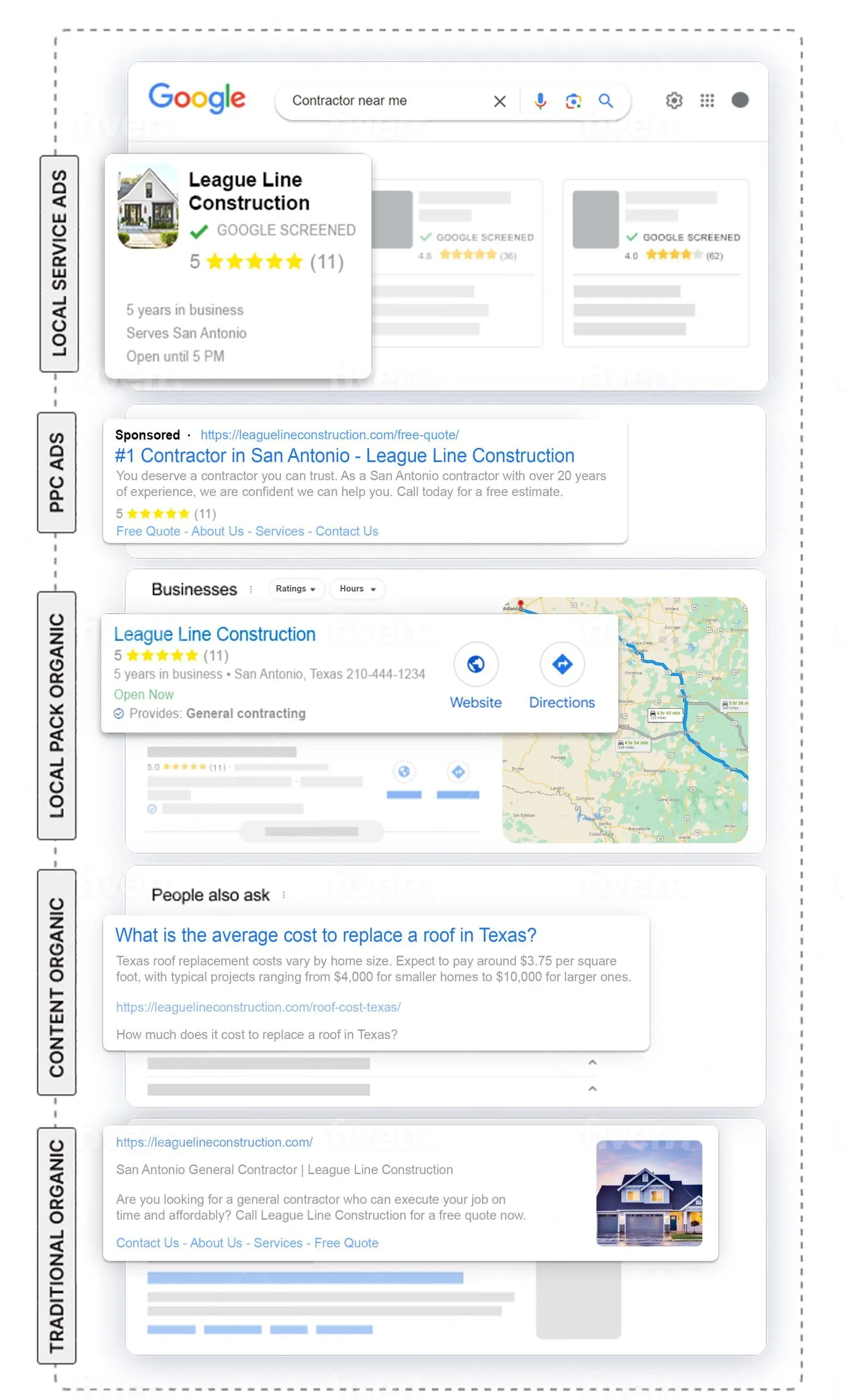
How Google Local Services Ads Work
LSAs sit above everything else on the page.
They show your business name, star rating, phone number, and the Google Guaranteed badge. You pay per lead, not per click. If someone calls through the ad, you pay. If they see it and do not call, you pay nothing.
The tradeoff: less control. Your placement depends on your reviews, your response time, and your profile completeness. You cannot write custom ad copy or target specific keywords the way you can with Search Ads.
How Google Search Ads Work
Search Ads are the sponsored listings that appear below the LSA block.
You bid on keywords, write your own ad copy, choose your landing page, and set your budget. You pay per click, not per lead. Full control over who sees your ads, what they say, and where people land when they click.
When to Use LSAs
Good starting point if you have solid Google reviews and want calls from people who need service right now. The pay-per-lead model is easier to budget around early on.
When to Use Google Search Ads
Better when you want control over messaging, when you are targeting specific service lines, or when you want to scale beyond what LSAs can deliver on their own.
Running Both at the Same Time
The contractors who dominate their local market usually run both. LSAs handle top-of-page urgent calls. Search Ads fill in the gaps and let you test messaging. Running both means you show up twice on the same page, which builds trust fast.
Quick Take: Start with LSAs to get your first leads. Once you have a baseline, layer in Google Search Ads for more control and scale.
How Google Ads Actually Work (Plain English)
You do not win Google Ads by having the biggest budget. That surprises a lot of people.
Google decides which ads show, and in what order, based on your bid AND the quality of your ad. Understanding this is the difference between a campaign that works and one that just costs money.
The Auction
Every time someone searches, an auction happens in milliseconds. Every advertiser targeting that keyword enters with a bid and a quality score. Google multiplies those together to get Ad Rank. Highest Ad Rank wins the top spot.
A contractor with a $3 bid and a strong quality score can outrank a competitor spending $8 per click. Budget alone does not determine placement.
Quality Score
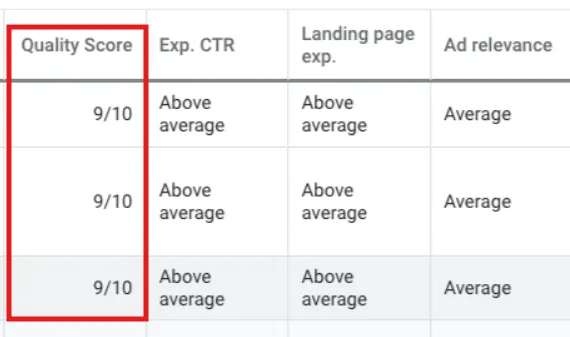
Quality Score is Google’s rating of how relevant your ad is to the person searching.
It factors in three things: your expected click-through rate, how relevant your ad is to the keyword, and how good your landing page is.
Low quality score means you pay more and show lower. High quality score means you pay less and show higher. One of the highest-leverage things to get right.
Ad Rank
Ad Rank is the final number that determines your position. Better ads at reasonable bids beat bigger budgets with mediocre ads. Simple as that.
The Right Campaign Types for Contractors
Search Campaigns
Start here. Most of your budget should live here.
Search campaigns put your ads in front of people actively searching for your services. Most control, clearest data, best results for contractors.
Performance Max
Google’s AI-driven campaign type that runs ads across Search, YouTube, Display, Gmail, and Maps. Google controls most of the targeting.
Our take: do not start with Performance Max. Build your search campaigns first, get a baseline, then test PMax once you understand your numbers. Running it before solid conversion tracking is in place is a fast way to waste budget.
Remarketing
Shows ads to people who already visited your website but did not call.
For higher-ticket services like HVAC system replacement or a full roof, where homeowners take a few days to decide, remarketing can recover leads you would otherwise lose.
What to Skip
Display-only campaigns and unguarded broad match keywords are the two fastest ways to waste money.
Display puts image ads on random websites with low intent. Broad match with no negative keywords matches your ad to searches that have nothing to do with your business. Google pushes both because they generate more clicks for Google. More on this in the mistakes section.
Keyword Strategy for Contractor Google Ads
Most contractor campaigns fail at the keyword level. Keywords too broad, wrong intent, no negatives. Getting this right is where the money is.
High-Intent Keywords That Convert
These signal the person is ready to hire, not just browsing.
- “AC repair near me”
- “emergency plumber [city]”
- “roof replacement cost [city]”
- “HVAC installation [city]”
- “water heater replacement [city]”
- “roofing contractor near me”
Notice the pattern. Specific service, location or proximity modifier, clear problem. These come from people who are ready to act.
We cover keyword strategy in much more detail in our dedicated guides on Google Ads for HVAC contractors, Google Ads for plumbers, and Google Ads for roofers.
Negative Keywords: The Most Underused Tool in Google Ads
If you are running Google Ads without a negative keyword list, you are wasting money. Guaranteed.
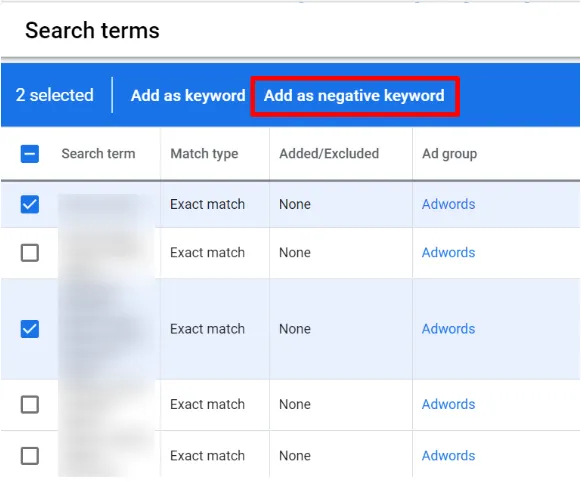
Negative keywords tell Google what NOT to show your ad for. Without them, your ads can show for:
- “how to fix AC myself” (DIY, not a customer)
- “HVAC technician jobs” (looking for work, not service)
- “free plumbing repair”
- “roofing supply store near me”
Build your negative list before launch. Review your search terms report every week for the first month.
Match Types Explained
| Match Type | What It Does |
|---|---|
| Exact [keyword] | Only shows for that exact search or close variants. Most control, least volume. |
| Phrase “keyword” | Shows for searches that include your phrase in order. Good middle ground. |
| Broad Match keyword | Shows for anything Google thinks is related. Least control, highest risk. |
Start with phrase and exact match. Add broad match later only with strong negative keyword lists in place. Google will push you toward broad match because it spends your budget faster. Do not take that bait without guardrails.
Long-Tail Keywords
More specific, lower search volume, but higher intent.
“Emergency AC repair cost in Orlando” has less volume than “AC repair” but the person searching is much further along. Lower competition, lower cost-per-click, better conversion rates. Build a mix of both.
Writing Google Ads That Actually Get Clicked
Headline Formula
You get three headlines, up to 30 characters each. Google rotates combinations.
- Headline 1: Service + Location (“AC Repair in Orlando”)
- Headline 2: Key differentiator (“Same-Day Service Available”)
- Headline 3: Call to action (“Call for a Free Estimate”)
Write 8 to 10 headline variations so Google can test combinations. Avoid vague headlines like “We Are the Best.” Every contractor says that. Lead with something specific.
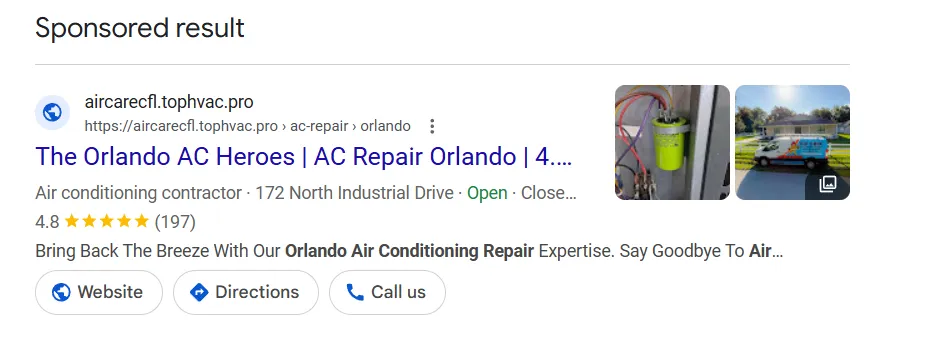
Ad Extensions
Extensions expand your ad and take up more real estate on the page. They do not cost extra unless clicked.
- Call Extensions: Shows your phone number. Mobile users can tap to call directly.
- Location Extensions: Shows your address. Builds local trust.
- Sitelink Extensions: Links to specific pages like services, reviews, and contact.
- Callout Extensions: Short phrases like “Licensed and Insured” or “No Service Fees.”
- Structured Snippets: Lists your specific services.
What Your Competitors Are Missing
Look at the ads running in your market. Most say the same thing. “Licensed and insured. Free estimates. Call today.”
That is background noise. The ads that stand out lead with specifics: response time, a guarantee, years in the market, or a direct answer to what the customer is worried about.
The Landing Page Problem
This might be the most important section in this guide. And it is the one most articles skip.
You can have perfect keywords, a high quality score, and a great ad. If you send that traffic to a page that does not convert, you are wasting money.
Why Your Homepage Is Killing Your Ad Spend
Your homepage is designed to introduce your whole business. Services, about section, blog, contact form. When someone clicks an ad for AC repair and lands on a homepage, they have to work to find what they came for.
Most of them just leave.
Ad traffic needs a dedicated landing page. One service. One message. One clear next step.
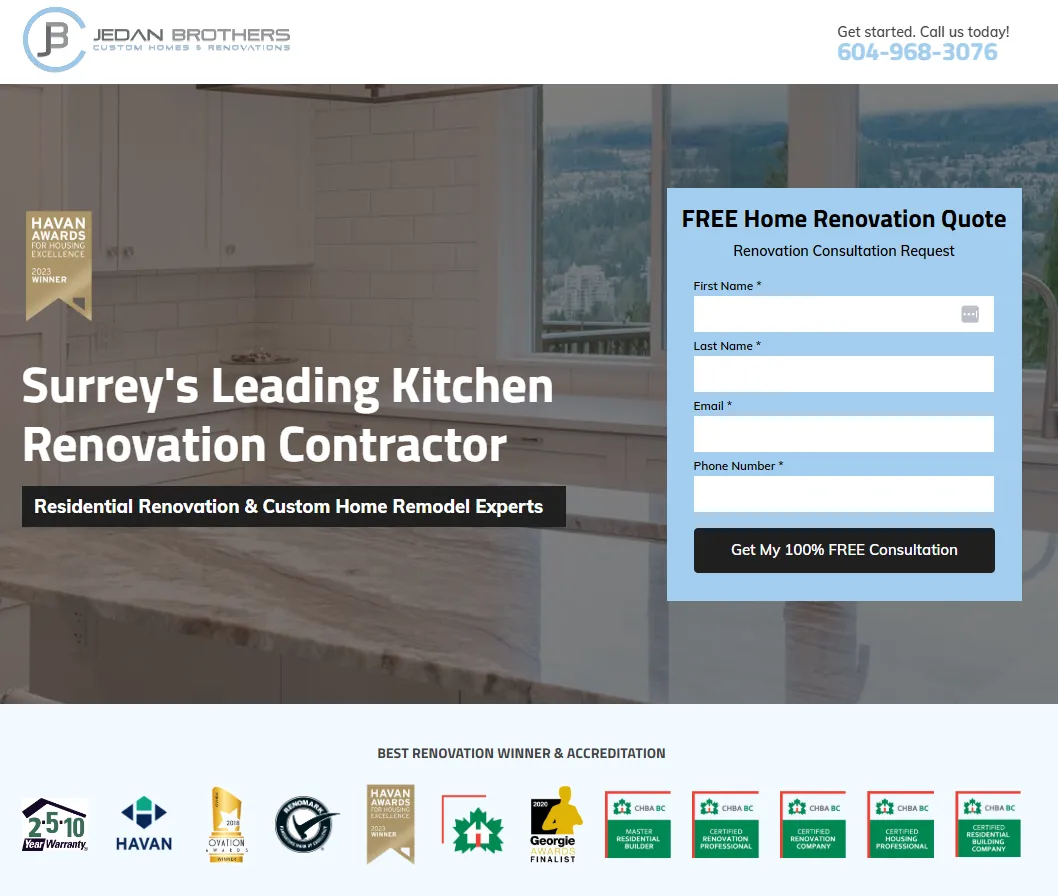
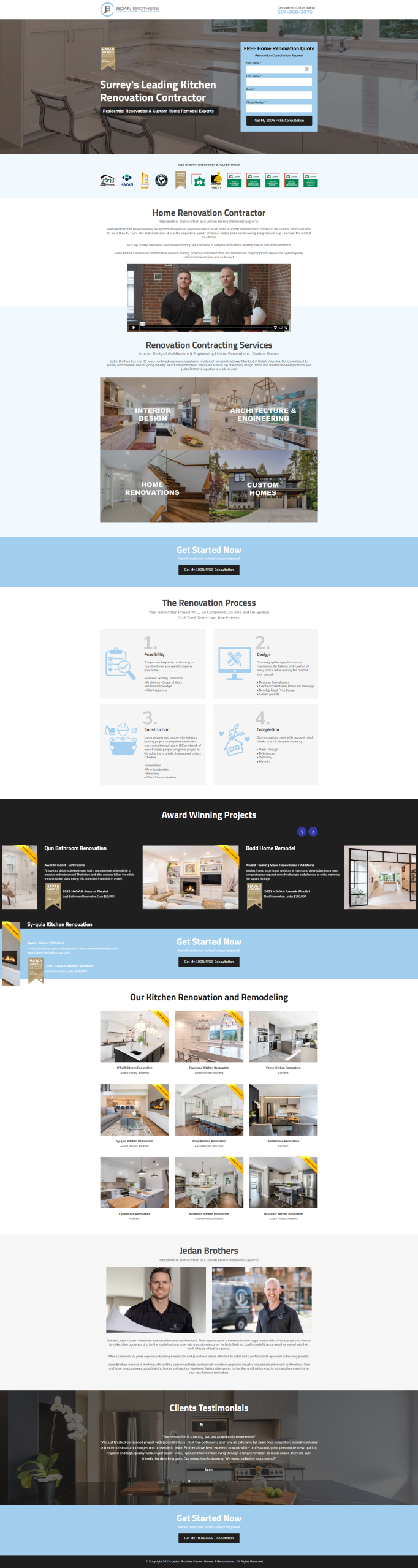
What a High-Converting Contractor Landing Page Looks Like
- Headline that matches the ad they clicked
- Clear value proposition above the fold
- Phone number large and prominent at the top
- Short form: name, number, what they need, when
- Trust signals: reviews, years in business, license number
- One call to action repeated throughout
No navigation menu. No links taking them elsewhere. One job: get them to call or fill out the form.
Click here to see the full page.
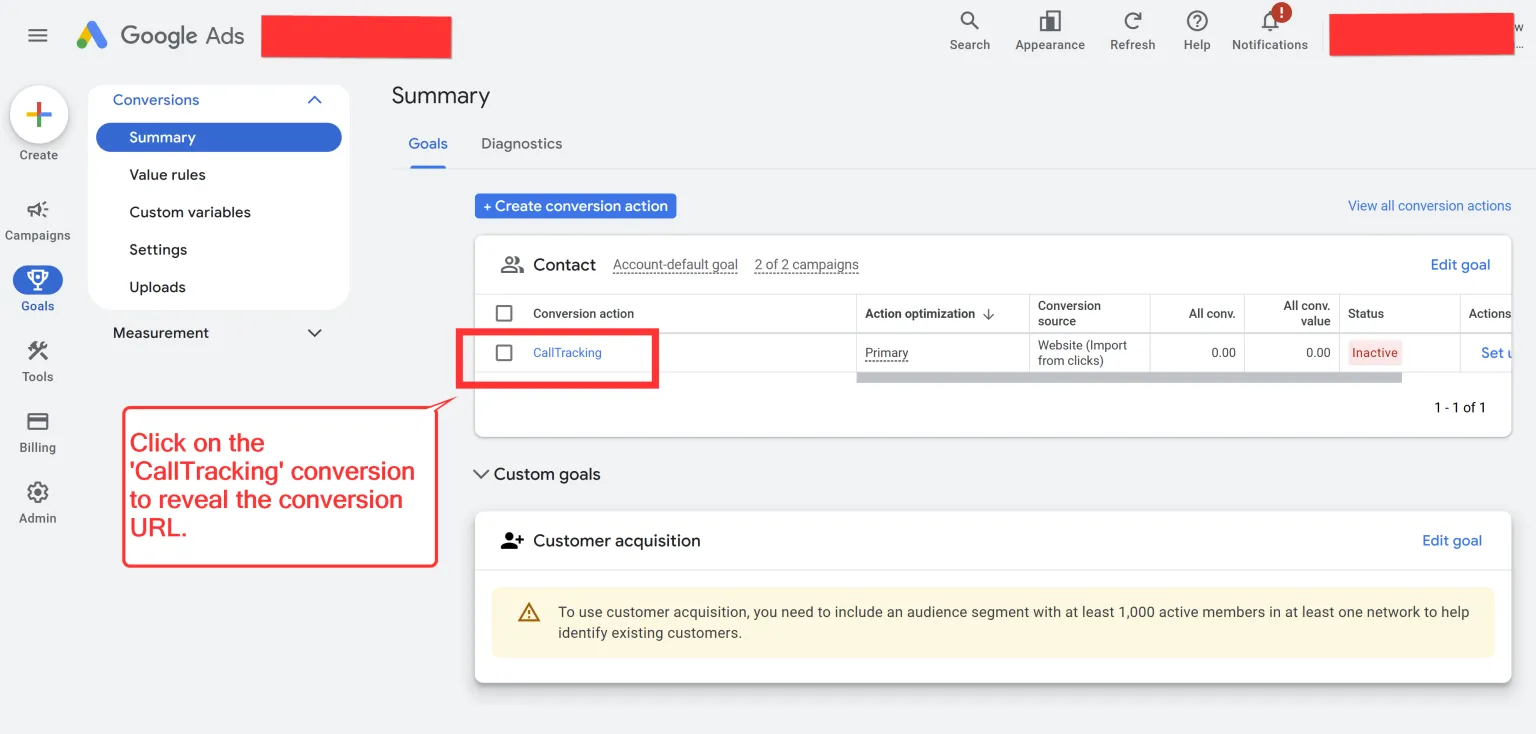
Call Tracking
Non-negotiable. If you are running Google Ads without tracking which calls came from which keywords, you are flying blind.
Call tracking assigns different phone numbers to different sources. When someone calls, you know which keyword triggered the ad and which ad they clicked. That data tells you where to put more money and where to cut.
Set this up before your first campaign goes live.
How Much Do Google Ads Cost for Contractors?
Costs vary by market, trade, and how competitive your city is. Here are real benchmarks to plan around.
Average Cost-Per-Click by Trade
| Trade / Service Type | Avg. Cost Per Click (Estimate) |
|---|---|
| HVAC (general) | $8 – $30+ |
| Emergency plumbing | $15 – $50+ |
| Roofing | $10 – $25 (General) / $30 – $90+ (High Intent) |
| Water heater replacement | $12 – $35+ |
| AC installation | $15 – $45+ |
| Drain cleaning | $6 – $20 |
Competitive markets like Miami, Dallas, or Phoenix will be on the higher end. Smaller markets will cost less. Emergency services almost always cost more because intent is highest.
What Budget Do You Actually Need?
$1,000 per month is a starting point in most markets, not a ceiling.
At that budget you are getting enough data to know what is working but you will not be competing at full volume. Most contractors running ads that consistently fill their schedule are spending $2,000 to $5,000 per month on ad spend alone, not counting management.
Do not start at $300 a month and expect meaningful results. You will not have enough clicks to optimize, and you will write off Google Ads before you gave it a real test.
| Monthly Ad Spend | What to Expect |
|---|---|
| $500 – $1,000 | Testing phase. Enough to validate keywords and get initial data. |
| $1,500 – $3,000 | Consistent lead flow for most markets. Real optimization possible. |
| $3,000 – $6,000 | Competitive volume. Multiple service lines running simultaneously. |
| $6,000+ | Market dominance. Running across all services and geographies. |
How to Calculate Your Target Cost Per Lead
Start with what a new customer is worth.
An average HVAC service call might be $300. An AC replacement is $8,000. A full roof is $15,000. Your acceptable cost per lead should reflect job value, not gut feeling.
If you close one out of four leads and an AC replacement is worth $8,000, you can afford $2,000 per closed job and still have a strong return. Work backward from job value.
Why Cheap Clicks Are Often the Most Expensive Mistake
A $2 click sounds better than an $18 click. But if the $2 clicks are from people who are just browsing and the $18 clicks are from homeowners who need service today, the math flips.
Focus on cost per booked job, not cost per click.
The 7 Mistakes Contractors Make With Google Ads
These show up again and again when we audit accounts. Check your own against this list.
- No call tracking. You are spending money with no idea what is generating calls. Fix this first.
- Sending traffic to the homepage. Every ad should go to a dedicated landing page for that service.
- No negative keywords. Check your search terms report. Your ads are showing for searches that have nothing to do with your business.
- Broad match with no guardrails. Use phrase and exact match and build your negative list before going broad.
- Flat budget year-round. HVAC spikes in summer. Roofing spikes after storms. Your bids should reflect what is actually happening in the market.
- No ad copy testing. Set up two or three headline variations and let Google test them. One of the easiest wins in the account.
- Accepting Google’s recommendations without reviewing them. Google optimizes for their revenue, not yours. Review every suggestion manually before accepting.
DIY vs. Hiring an Agency
You can run Google Ads yourself. People do it. The question is whether you will catch the things that cost money before they drain your budget.
The platform looks simple on the surface. The decisions underneath, keyword strategy, match types, bid management, landing page optimization, tracking setup, take real time to learn and manage well.
What a Properly Managed Account Looks Like
- Weekly search term reviews to find new negative keywords
- Monthly bid adjustments based on what is performing
- Seasonal budget shifts based on demand patterns
- Ad copy tests running at all times
- Landing page performance monitored
- Conversion tracking verified and accurate
If you are running a busy contracting business, doing all of this while managing jobs, crew, and customers is a lot.
Accounts that underperform are usually the ones where the owner set it up once and never had time to dig into the data.
What to Look for in a PPC Agency
- They specialize in home services or local service businesses, not a mix of ecommerce and everything else.
- They can show you work in your vertical. Ask for references from other contractors.
- They give you access to your own account. You own the data. Any agency running ads in their own acount on your behalf is a red flag.
- They track calls and form fills as conversions, not just clicks and impressions.
- They talk about cost per booked job, not cost per click.
Red Flags
- They guarantee a specific lead count before seeing your market or budget.
- Your ads run in their agency account instead of your own.
- Reports only show impressions and clicks, never call volume or conversion data.
- They cannot explain their keyword strategy in plain English.
- Long contract with no performance clause.
How Google Ads and SEO Work Together
Contractors often treat paid ads and organic search as competing priorities. It is not one or the other.
The search results page has multiple sections: LSAs at the top, paid ads below that, the map pack, then organic. A contractor running ads with strong SEO can show up in multiple spots at once. That kind of presence looks like market dominance.
Why Running Ads Without SEO Leaves Money on the Table
Paid ads stop the moment you stop paying. Organic rankings keep driving traffic whether you are spending or not.
Your ad data also makes your SEO smarter. Keywords that convert in Google Ads are the same keywords worth targeting in your content. You are not guessing. You have real data.
How Your Google Business Profile Affects Ad Performance
Your Google Business Profile directly impacts your LSA placement. More reviews, faster response times, and a complete profile push your ranking up.
Running ads while your GBP has 12 reviews and a half-finished profile is like sending someone to a job interview in a wrinkled shirt. The first impression undermines everything else.
The Full Google Real Estate Map
- Local Services Ads: top of page, pay-per-lead, requires Google Guaranteed verification
- Google Search Ads: below LSAs, pay-per-click, full control
- Map Pack: organic, driven by your GBP and local SEO
- Organic Results: SEO, driven by your website content and backlinks
Contractors who own multiple spots on that list are the ones whose phones do not stop ringing.
Frequently Asked Questions
How much should a contractor spend on Google Ads?
$1,500 to $3,000 per month in ad spend is a reasonable starting range for most markets. The number that matters most is not what you spend but what you close in new jobs relative to that spend.
Are Google Ads worth it for small contractors?
Yes, with the right setup. A small contractor spending $1,000 a month with a solid campaign, dedicated landing page, and call tracking can compete with larger companies. The setup matters more than the size of the business.
How long does it take to see results?
You can get calls within the first week. But the first 30 to 60 days are a learning phase. Most well-run campaigns hit their stride around the 60 to 90 day mark.
What is the difference between Google Ads and Local Services Ads?
Google Ads are pay-per-click. You bid on keywords, write your own copy, and pay when someone clicks. LSAs are pay-per-lead. You pay when someone calls through the ad. LSAs appear above Google Ads and are heavily influenced by your reviews and profile.
Do I need a website to run Google Ads?
You need a landing page. It does not have to be a full website. A single well-built landing page can outperform a full site if it is designed specifically to convert ad visitors into calls.
What is a good click-through rate for contractor Google Ads?
Above 5% is solid. Strong campaigns can push 8 to 10%. Below 3% means your headlines are not compelling enough to get the click.
Should I use Google Ads or Facebook Ads?
Google Ads captures people actively searching for your service right now. Facebook reaches people before they start searching. If your goal is booked jobs from people who need service today, start with Google Ads. Use Facebook as a complement once your Google Ads foundation is in place.
How do I know if my Google Ads are working?
You need conversion tracking in place. The metrics that matter: cost per call, cost per form fill, cost per booked job. Clicks and impressions alone tell you nothing useful.
Ready to Stop Guessing and Start Getting Calls?
Most contractors who run Google Ads on their own or with a generalist agency end up in the same place. Money spent, no clear picture of what worked.
We built this service specifically for HVAC, plumbing, and roofing contractors. Not one of thirty industries we serve. The only one.
90 days to a fuller pipeline, or you do not pay. We only work with up to three companies per city.
Fill out a short application below to see if your city is open. Takes two minutes.
We only take on 3 companies per city. If your city is open, we will map out exactly what we would do for your business on the first call, no charge.